YOUR EVERYDAY WEB TOOLKITSee What's Growing View Releases ↗
FREE · PRIVATE · BROWSER-FIRST
Everyday file work,
without the friction.
Crop images, manage PDFs, turn Markdown into polished documents, build slide decks, compress SVG files, and more—directly in your browser.
✓ No installation✓ No forced account✓ Private by design
● ● ●tool launcherOWT / 01
SUGGESTED ACTIONS
LOCAL PROCESSING ACTIVEYour files stay on this device whenever supported.
WORKS WITH
01
FIND THE RIGHT TOOL
What are you
trying to do?
Start with the task—not the file type. Choose an intent and the workspace will surface the tools that fit.
Crop ImageFrame, resize and export images with precise browser controls.JPG · PNG · WEBPOPEN ↗Compress SVGRemove unnecessary vector data while preserving sharp, clean artwork.SVGOPEN ↗Markdown to PDFTurn structured writing into a polished, shareable document.MD → PDFOPEN ↗Markdown to SlidesBuild presentation-ready decks from a simple Markdown source.MD → PPTXOPEN ↗PDF ToolkitMerge, split, reorder and prepare documents without needless friction.PDFOPEN ↗PathIQ GameDraw a continuous path through every cell visiting clues in numerical order.PUZZLE · GAMEOPEN ↗PX to REMTwo-way CSS conversion between pixels and rem with a custom root font size.PX ↔ REMOPEN ↗
02 / MARKDOWN WORKFLOW
One source.
More ways to publish.
Write once in Markdown, then shape the same content into a polished PDF or a presentation-ready deck.
launch-notes.md● saved
# Product launch

## The idea
Useful tools should feel invisible.

## Principles
- Fast in the browser
- Private by design
- Simple by default
MDBUILD↘
PDF / 01Product
Product
launch
Useful tools should feel invisible.
ONLINE WEB TOOLKIT03
IMAGE WORKBENCH
Keep the pixels.
Lose the extra work.
Crop and optimize images with focused controls that work directly in your browser.
OWT
04 / PDF ASSEMBLY
Put every page
in its place.
Organize, combine, and prepare PDF files without turning a simple job into a complicated workflow.
Open PDF tools ↗01DRAG TO REORDER
Cover
•••02DRAG TO REORDER
Overview
•••03DRAG TO REORDER
Details
•••04DRAG TO REORDER
Summary
•••05
FUN & GAMES
BROWSER ENGINE · FREE · DAILY MISSIONS
One continuous line.
Zero guesswork.
Thread your route through every cell while visiting clues in numbered order. Experience PathIQ, our browser-native tactical path puzzle featuring daily missions, tiered campaign progression, and procedural Web Audio feedback.
Daily UTC RotationFresh puzzle every 24 hours
Multi-Tier CampaignFrom 5×5 novice to 8×8 master
Web Audio SynthesisZero-latency procedural tones
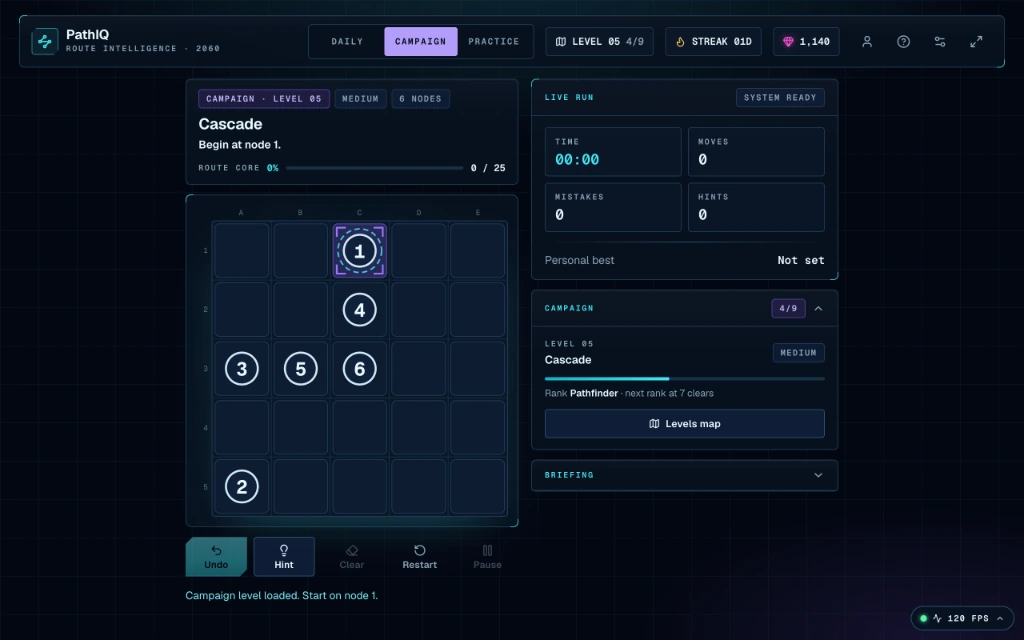

TACTICAL HUDLive run telemetry & move counter
TOUCH OPTIMIZEDFluid drag & swipe route drawing
06
PRIVACY ARCHITECTURE
Your files don’t
need a round trip.
Many tools process content locally in your browser, giving you faster results and greater control over your files.
INPUTYour file01
→PROCESSYour browser02
→OUTPUTYour result03
Local when
Uploads only when
necessary.
Clear about
what happens.
07
COMPLETE TOOL INDEX
Every tool.
Ready when you are.
A growing directory of focused utilities. No installation, no learning curve—just open and work.
TOOLFORMATACTION
01Crop ImageFrame, resize and export images with precise browser controls.JPG · PNG · WEBPOPEN ↗02Compress SVGRemove unnecessary vector data while preserving sharp, clean artwork.SVGOPEN ↗03Markdown to PDFTurn structured writing into a polished, shareable document.MD → PDFOPEN ↗04Markdown to SlidesBuild presentation-ready decks from a simple Markdown source.MD → PPTXOPEN ↗05PDF ToolkitMerge, split, reorder and prepare documents without needless friction.PDFOPEN ↗06PathIQ GameDraw a continuous path through every cell visiting clues in numerical order.PUZZLE · GAMEOPEN ↗07PX to REMTwo-way CSS conversion between pixels and rem with a custom root font size.PX ↔ REMOPEN ↗07
LATEST UPDATES
What we're
working on.
Dive into stories, strategies, and tutorials from our team as we design, build, and optimize modern web tools.
View all blogs ↗
July 25, 2026
How to Quickly Crop Images Directly in Your Browser
Crop, frame, and resize your images in seconds using a private, client-side cropping tool.

July 25, 2026
The Complete Guide to Encoding and Decoding Images with Base64
Understand when to use Base64 image strings in your code and how to convert them instantly using local browser tools.
July 25, 2026
How to Create Fast, Beautiful Slideshows from Plain Markdown
Learn how to turn any markdown file into an interactive, browser-based presentation without complex slide design software.
08
KNOWLEDGE BASE
Frequently asked
questions.
Everything you might want to know about the toolkit, privacy guarantees, and supported formats.
07 / ALWAYS GROWING
The toolkit grows
with the work.
New utilities, formats, and workflows are added over time—without turning simple tools into complicated software.
AVAILABLE NOWImage · PDF · Markdown
IN DEVELOPMENTMore focused workflows
EXPLORINGAdditional export formats
READY WHEN YOU ARE